


Hertz Rent-a-Car
4.75.67K Reviews
App Specs
- Version
- 5.6.0
- Updated On
- License
- Free
- Downloads
- 1,000,000+
- Developer
- The Hertz Corporation
- Categories
- Travel & Local
- Platform
- Android, iOS
Screenshots
 Analysis by AppCompare
For a household sharing travel plans, a rental app is most useful when one person can research options while everyone else stays clear about who is actually making the booking. I find Hertz Rent-a-Car most practical when a trip needs a car from a Hertz location and I want to compare vehicle choices before committing. It is a free travel app from The Hertz Corporation, with a 4.7 average from around 46,000 ratings and over one million installs. That popularity is reassuring, but the real question is whether its rental workflow fits the way you travel and coordinate.
When one person plans for everyone
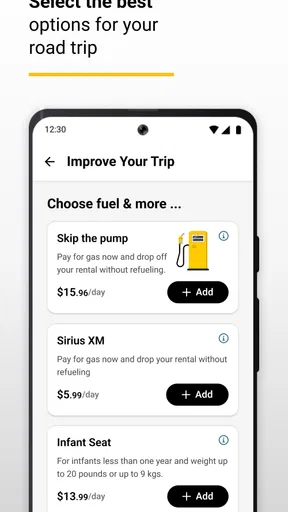
Picture a family landing at an airport with luggage, a child’s car seat, and a drive ahead. One adult can use the app to look at rental possibilities before the trip, while the other handles bags and arrival logistics. That division can make planning calmer, but it is worth agreeing in advance who will be responsible for the reservation and rental details. A shared phone or tablet may help with browsing; it should not blur who is managing the booking.
I would use the app to narrow down the kind of vehicle that suits the trip, rather than treating the first appealing option as an automatic choice. A larger vehicle may be more comfortable for people and luggage, while a smaller one may be easier to handle on a city break. The useful comparison is not simply “which car looks best?” but “which option makes this particular journey easier?” Check the pickup location and dates carefully before anyone in the group builds plans around a choice.
Keeping account and booking responsibilities clear
For a couple or household that travels together, a sensible routine is to let one person own the reservation and share the relevant plans verbally or through the household’s usual calendar. That avoids confusion over who should make changes if the flight time shifts or the itinerary changes. I would not assume that installing the app on several devices creates a shared household account or automatically keeps every traveler in sync; treat account access and reservation responsibility as separate decisions.
This boundary matters most when more than one person is researching. Two people can compare vehicle needs and pickup timing, but it is better to agree on one person to complete the booking and handle any later edits. Before relying on a reservation, make sure the person who will manage it can access the account and the details they need. That small bit of coordination is more useful than having everyone tap around independently.
Who benefits, and who may prefer another route
The app is a natural fit if you already intend to rent from Hertz and want a phone-based way to arrange travel. It can also suit a traveler who wants to check rental options while planning flights or lodging, instead of waiting until arrival to start comparing. If your trip depends on a particular vehicle type, it is worth looking early and checking that the available choice works for your group, rather than assuming every location will offer the same selection.
If you are choosing among several rental companies, a comparison site or each company’s own app may be a better first stop. Those tools can help you weigh alternatives across providers; Hertz’s app is more relevant once you are considering a Hertz rental. Likewise, if you do not need a car for the whole trip, local transit, a taxi, or a short-term ride option may be simpler than arranging a rental. The right choice depends on where you are going, how much you need to carry, and how often you will drive.
Worth Reading Before You Choose

EA SPORTS FC Mobile 26 Is a Bigger Football Game, but It Takes Time

Flipboard Shows What News Apps Must Do Beyond the Feed

Switching to Android Auto Means Rethinking Your Driving Routine

Google Calendar Makes a Crowded Week Easier to Manage

Ludo King Makes the Most of the Minutes Between Plans

Baby Panda World Brings Quick Play to Modern Phones, but Its Game Library Feels Busy
Age, trust, and realistic expectations
The app is rated for Everyone, which describes its content suitability rather than who can rent a vehicle. I would not treat a child’s ability to use a phone as permission to manage a rental or account. An adult should remain responsible for booking decisions and any arrangements connected with the trip. For a shared household device, it is also sensible to avoid leaving account access open for casual browsing if the device is used by several people.
Trust is also about checking details instead of assuming the app settles every travel question. A booking screen can help organize a rental, but travelers should still read the conditions attached to the option they are considering and make sure the pickup plan matches their arrival. If someone else in the household is driving, coordinate who will be responsible for the rental and confirm the relevant requirements directly before travel. That is especially important when plans involve more than one driver or a late arrival.
Planning a Hertz rental around real travel needs
The app’s strongest role is as a focused tool for arranging a Hertz rental, not as an all-purpose trip planner. I would open it when I have a likely pickup place and travel dates, then compare the choices against the practical needs of the trip. That gives the vehicle search a purpose: enough seats, room for bags, and a pickup plan that works for the people traveling.
Getting Started: Easy Peasy
The first thing you need to know is that downloading and setting up the Hertz Rent-a-Car app is as straightforward as it gets. Available on both Android and iOS, it takes just a few taps to install. Once you fire it up, you’ll notice the clean, user-friendly interface that doesn’t bombard you with a gazillion options. Instead, it gets you where you need to go—fast.
It is a free app in the Travel & Local category, and its current version is 4.84.0. Its release was on April 9, 2019, and it requires Android 8.0 or later. Those details make it easier to judge whether it will run on an older Android device; iPhone users can find it on iOS as well. The app is developed by The Hertz Corporation, so it is the company’s own channel rather than an independent rental marketplace.
Booking a Car: Like a Walk in the Park
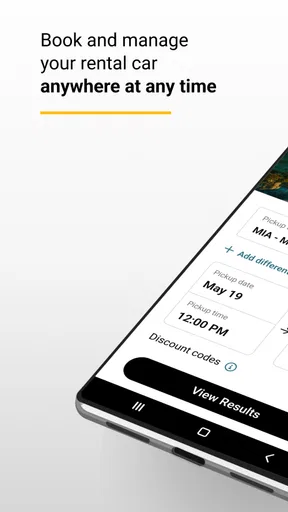
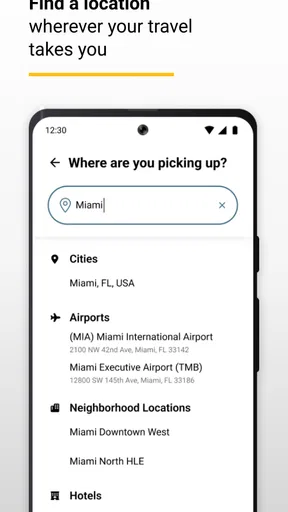
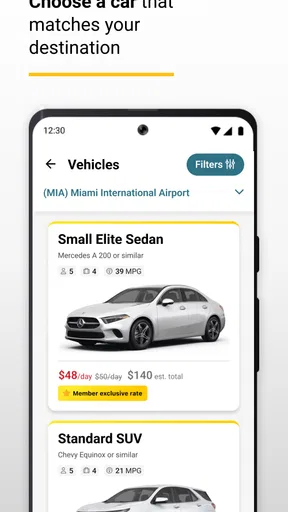
When I first opened the app, I was greeted with a simple search bar to input my pickup location and dates. In seconds, a list of available cars popped up, complete with pictures, prices, and those all-important mileage details. The app also lets you filter by vehicle type or feature, which is super handy if you’re picky about your ride.
Those filters are most useful when I start with a real constraint instead of browsing at random. For example, if several people are traveling with bulky luggage, I would first consider the space they need, then use the available vehicle choices to narrow the search. A sports car may look appealing, but it is not automatically the smart pick for a family airport transfer. Likewise, an electric vehicle may suit a trip with a manageable route and charging plan, but the traveler should think through that plan before choosing one.
Once you’ve found your dream car, booking it is as easy as pie. Just enter your details, hit confirm, and voilà, your car is booked! I was impressed by how seamless the process was—no fuss, no muss.
Even with a smooth booking flow, I would pause at confirmation and check the location and dates one more time. Airport and local pickups serve different plans: an airport rental can make sense when you need to leave directly after landing, while a local pickup may be better if you are spending the first part of a trip in town. For a group, share the confirmed plan with the other travelers so nobody assumes the car will be collected somewhere else.
Features That Stand Out
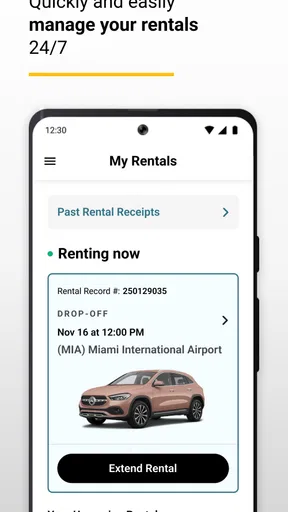
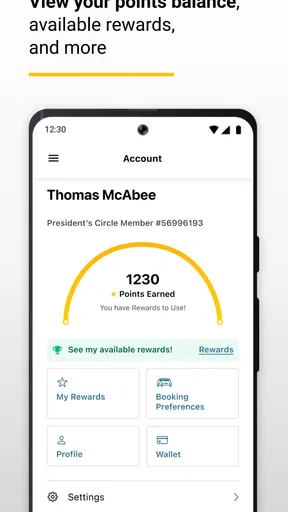
One of the coolest features I found was the ability to modify or cancel reservations directly from the app, which is perfect for those unexpected changes in plans. Plus, if you’re a Hertz Gold Plus Rewards member like me, you can easily manage your points and redeem them for free rentals. Now, that's what I call a sweet deal!
Being able to handle a change from the phone is particularly useful when travel timing shifts. I would still check the updated reservation after making an edit, then tell anyone relying on the original pickup time or vehicle plan. For shared travel, one person making the change and communicating it is less confusing than several people trying to fix the same booking.
Another nifty feature is the roadside assistance option. With just a tap, you can get help if you find yourself in a pickle on the road. It's like having a safety net in your pocket, which, let's be honest, is pretty comforting when you’re far from home.
I see that as a helpful route to assistance, not a reason to skip preparation. Before setting off, travelers should know where the reservation information is and make sure the person driving can reach the app or account details if needed. In a household where the booking manager is not the driver, agree on how to contact that person and locate the rental details rather than discovering the gap during a stressful moment.
User Experience: Smooth Sailing
I’ve got to say, navigating the app feels like a breeze. The design is intuitive, and everything is laid out in a way that feels logical and user-friendly. Even if you’re not a tech whiz, you’ll find it easy to get around.
That simplicity is valuable when you are planning on a small screen, but I would not let convenience replace careful comparison. Look at the complete options available for your route and dates, and consider whether a rental is genuinely useful for the whole trip. If the car will sit unused while you stay in a walkable area, using transit for that portion and renting only when needed may make more sense than organizing a vehicle around every day of the itinerary.
What really sets the app apart, though, is the real-time updates. Whether it’s changes in your reservation or special deals popping up, the app keeps you in the loop. I loved getting notifications about discounts—who doesn’t love saving a few bucks?
For a group, updates are only helpful if the person who needs to act sees them. I would keep the booking with the traveler who is handling the rental and pass along any important change to the rest of the party. A notification should prompt a check of the actual reservation, not an assumption that everyone’s plans have changed automatically.
Final Thoughts: A Must-Have Travel Companion
After using the Hertz Rent-a-Car app, I can confidently say it’s a must-have for anyone who travels frequently or just needs a reliable set of wheels in a pinch. It’s not just about renting a car; it’s about enhancing your journey with convenience and peace of mind.
I would recommend it most to travelers who already favor Hertz, want to manage a rental on their phone, and have a clear idea of when and where they need the car. The app is less compelling as a starting point for someone who has not decided whether to rent or is mainly trying to compare every company in one place. In that case, first compare the broader travel options, then use this app if Hertz suits the plan.
So, the next time you’re planning a trip, give this app a whirl. Trust me, you won’t regret it. Life’s too short for long lines and complicated bookings, right? Happy travels!
Pros
- User-friendly interface for quick bookings.
- Wide variety of vehicles available.
- Flexible rental durations to suit needs.
- Loyalty program offers attractive rewards.
- 24/7 customer support for assistance.
Cons
- Limited locations in rural areas.
- Higher prices during peak seasons.
- Occasional hidden fees in contracts.
- App requires stable internet connection.
- Lack of comprehensive insurance options.
FAQs for Hertz Rent-a-Car
How do I book a car using the Hertz Rent-a-Car app?
Booking a car through the Hertz Rent-a-Car app is straightforward. Simply download the app, create an account or log in, and select your desired location and rental dates. The app will show available vehicles, allowing you to choose based on your preferences and budget. Confirm your booking details and proceed to payment to complete the reservation.
What features does the Hertz Rent-a-Car app offer for managing reservations?
The Hertz app offers several features to manage your reservations efficiently. You can modify existing bookings, cancel reservations, and access real-time updates about your rental status. Additionally, the app provides a digital rental agreement and allows you to extend your rental period if needed, giving you flexibility and control over your plans.
Are there any loyalty benefits when using the Hertz Rent-a-Car app?
Yes, the Hertz app integrates with the Hertz Gold Plus Rewards program. Members can earn points on qualifying rentals, access exclusive discounts, and enjoy faster service at participating locations. The app allows you to track your points, view membership status, and redeem rewards, making it a valuable tool for frequent renters.
Is the Hertz Rent-a-Car app user-friendly for first-time users?
Absolutely, the Hertz app is designed with user-friendliness in mind. The intuitive interface guides first-time users through each step, from browsing car options to finalizing a reservation. Additionally, the app provides helpful tips and FAQs within the platform to assist users who may have questions during the booking process.
What payment options are available through the Hertz Rent-a-Car app?
The Hertz app supports multiple payment methods, including major credit and debit cards. Users can securely store their payment details for quick checkout in future transactions. Additionally, the app often supports promotional codes and discounts, allowing users to apply savings directly at checkout, making the payment process both flexible and convenient.


